Using a dial plan to modify how calls are placed
In Bria, a dial plan can be used to modify how your calls are placed. For example, a dial plan can change any number that starts with “+1613” to “613”.
- To modify (transform) the input (the number to be dialed), such as to add the “9” required to obtain an outside line from a PBX.
- To select the account to use to place a call, if users have more than one account. For example, to use Account 1 to dial a number starting with 61, and use Account 2 to dial a number starting with 64.
Your administrator can set up dial plans for additional SIP accounts that are configured in the Bria Portal. If you have any questions regarding the dial plans that Bria is using, talk to your administrator.
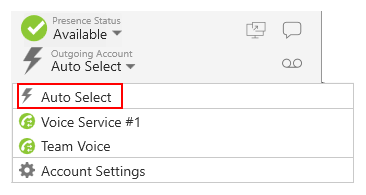
If you have multiple SIP accounts, it is recommended to set Outgoing Account to Auto Select so that Bria can access the dial plans of all enabled accounts. If it is set to a specific account, Bria only checks the dial plan of the selected account.

 About this document
 ® logo are registered trademarks of CounterPath Corporation.